Accelerating Web Design Workflows with Professional Website Wireframe Layout UI UX Kits
In the fast-paced world of digital product development, the gap between a conceptual idea and a functional website is often bridged by one critical phase: planning. Whether you are a seasoned web designer, a developer tasked with building a complex application, or a project manager overseeing a site migration, the clarity of your initial blueprint dictates the success of the final build. This is where Website Wireframe Layout UI UX Kits become indispensable. These comprehensive collections of pre-designed elements, page layouts, and flowchart symbols are not merely aesthetic assets; they are functional tools designed to streamline the architecture of information and the visualization of user journeys.
Integrating a high-quality wireframe kit into your workflow transforms the often tedious process of drawing boxes and labeling connections into a dynamic, strategic session. Instead of spending hours sketching basic headers, footers, or navigation bars from scratch, professionals can leverage these kits to focus on the logic of the site structure. The result is a significant reduction in production time and a marked increase in the consistency of the design output.
The Strategic Role of Wireframing in Modern Development
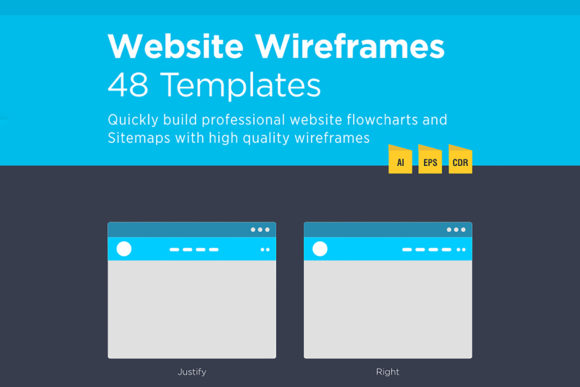
Wireframing serves as the skeleton of any digital project. It strips away the distractions of color, typography, and imagery to reveal the underlying structure and functionality. When utilizing Website Wireframe Layouts UI Kits, the goal is to create professional website flowcharts and sitemaps quickly without sacrificing quality. These kits provide a standardized vocabulary for designers and stakeholders to communicate effectively.
For entrepreneurs and small business owners, understanding the scope of a website project can be daunting. A visual sitemap created with these tools demystifies the process, showing exactly how many pages are involved and how users will navigate from the homepage to a conversion point. For educators and publishers, it helps organize vast amounts of content into a logical hierarchy. By using a dedicated kit, you ensure that every element, from a simple contact form to a complex e-commerce checkout flow, is accounted for before a single line of code is written.
Optimizing the Pre-Design Phase
The most significant value of these kits lies in the pre-design phase. Before diving into high-fidelity mockups in tools like Figma or Adobe XD, it is crucial to establish a solid foundation. A robust wireframe kit allows you to map out the user flow in seconds. You can drag and drop elements to simulate how a visitor moves through the site, identifying potential bottlenecks or confusing navigation paths early on.
Consider a scenario where a marketing team is launching a new product landing page. Using a minimal web flowchart feature set within a wireframe kit, the team can rapidly iterate on different layouts. They can test whether placing the call-to-action above the fold yields a better logical flow than burying it in the content. Because the elements are vector-based and easily manipulable, changes that once took hours can now be executed in minutes. This agility encourages experimentation and leads to more data-driven design decisions.
Compatibility and Integration Across Tools
A major friction point in design workflows is file compatibility. A truly versatile Website Wireframe Layout UI UX Kit must integrate seamlessly with the software ecosystems that teams already use. Professional kits typically include a wide range of file formats to ensure this interoperability. For instance, having access to CDR CorelDraw x7 files is essential for agencies that rely on Corel's vector capabilities, while Ai 10v (Adobe Illustrator) and EPS 10v formats cater to the broader industry standard of Adobe Creative Cloud.
Beyond vector editors, the inclusion of JPEG and PDF formats ensures that these wireframes can be easily shared with clients or stakeholders who may not have design software installed. A project manager can export a sitemap as a PDF and attach it to a project brief, ensuring everyone is aligned on the site structure. Developers can reference these static images during the coding phase to understand layout requirements without needing to open heavy design files. This flexibility makes the kit a "must-need tool" for cross-functional teams involving web designers, developers, and project managers.
Enhancing Collaboration and Consistency
Consistency is the hallmark of professional web design. When multiple designers work on different sections of a large website, discrepancies in button styles, input fields, or grid structures can creep in, leading to a fragmented user experience. A comprehensive wireframe kit mitigates this risk by providing a unified library of 80 common website page mini wireframes and page layouts. Whether you are designing a blog archive, a user profile dashboard, or a pricing table, the elements share the same visual language and proportional logic.
This standardization extends to flowchart related elements as well. Decision diamonds, process rectangles, and connector lines all adhere to a clean, minimal aesthetic that keeps the focus on the logic rather than the decoration. When teams use the same set of assets, communication becomes more efficient. A developer knows exactly what a specific icon represents because it has been used consistently throughout the documentation. This shared context reduces misinterpretation and minimizes the back-and-forth clarification emails that often bog down projects.
Practical Implementation Tips for Maximum Efficiency
To get the most out of a Website Wireframe Layout UI UX Kit, it is important to approach its usage with a structured mindset. Here are several practical strategies for integrating these resources into your daily routine:
- Start with the Sitemap: Before arranging individual page elements, use the flowchart symbols to map the entire site hierarchy. Determine the parent-child relationships between pages to ensure a logical navigation structure.
- Leverage Drag-and-Drop Speed: Take advantage of the drag-n-drop functionality. Instead of drawing rectangles for every image placeholder or text block, pull pre-made components from the kit. This allows you to assemble beautiful flowcharts in minutes rather than hours.
- Customize for Context: While the kits provide 100 vector elements, do not feel constrained by them. Use the base elements as a starting point and modify them to fit specific project needs. The vector nature of AI and EPS files ensures you can scale and edit without losing quality.
- Iterate Rapidly: Create multiple versions of a key user flow. Because the elements are reusable, you can duplicate your artboard and try alternative arrangements to see which offers the smoothest user journey.
- Document as You Go: Use the kit to create living documentation. As the project evolves, update the wireframes to reflect changes in scope. This keeps the development team aligned with the current vision.
Supporting Long-Term Project Health
The utility of a high-quality wireframe kit extends beyond the initial launch. As websites grow and evolve, having a clear, archived record of the original structure is invaluable for future updates or redesigns. When a new feature needs to be added six months down the line, you can refer back to your original flowcharts to understand how the new component fits into the existing ecosystem. This long-term perspective is crucial for maintaining the integrity of the user experience over time.
Furthermore, for freelancers and agency owners, these kits serve as a force multiplier. They allow you to take on more projects or deliver higher quality work within tighter deadlines. The ability to plan a user flow in a few seconds means more time can be allocated to refining interactions, optimizing performance, or engaging with clients. It shifts the focus from the mechanics of drawing to the strategy of solving user problems.
Conclusion: Elevating Your Design Process
In an industry where time is money and clarity is king, Website Wireframe Layout UI UX Kits offer a pragmatic solution to the complexities of web design. They bridge the gap between abstract ideas and concrete plans, providing a tangible framework for building successful digital products. By offering a vast array of elements, compatible file formats, and a streamlined workflow, these kits empower professionals to create stylish website flowcharts and site maps with ease.
Whether you are mapping out a simple brochure site or orchestrating a complex web application, the right tools make all the difference. Embracing these resources allows you to work smarter, collaborate more effectively, and ultimately deliver a superior product to your users. For those seeking support or further guidance on implementing these designs, reaching out to the creator through their profile page or email ensures you have the backing needed to maximize the potential of these powerful design assets. With the right preparation and the right toolkit, planning your next web project becomes not just a task, but a strategic advantage.