Elevate Your Brand with a Versatile Floral Botanical Logo Collection
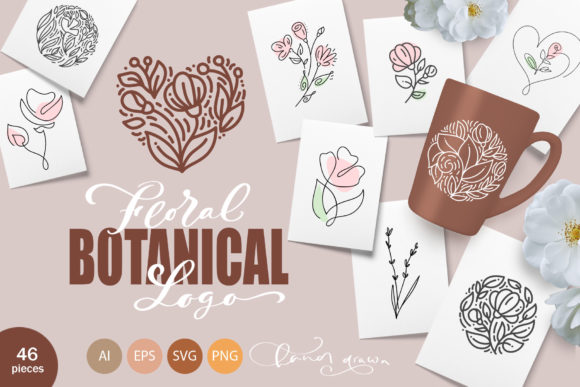
Welcome to the world of Happy Letters shop, where creativity meets precision. I am thrilled to introduce a new set designed specifically for those who appreciate the delicate beauty of nature combined with modern design utility: the Floral Botanical Logo collection. This isn't just a pack of clipart; it is a comprehensive toolkit featuring monoline flowers like roses and tulips, seamless floral patterns, round emblems, and distinct flower logos. Whether you are crafting a brand identity for an eco-shop, designing wedding invitations, or creating abstract fashion elements, these hand-drawn vintage elements offer the flexibility you need. However, diving into digital assets without a clear strategy can lead to wasted time and mediocre results. Let's explore how to make the most of this bundle while avoiding common pitfalls that many creators encounter.
Understanding the Value Beyond the Aesthetic
At first glance, a Floral Botanical Logo set might seem like a simple addition to your design library. Yet, its true value lies in its versatility across various mediums. This specific collection includes 46 unique elements: six seamless patterns, twelve emblems, fourteen flower lines, and fourteen dedicated logos. These are available in vector formats (EPS 10, AI 10, SVG) and high-resolution raster PNGs (4000x4000 px) with transparent backgrounds.
Many beginners make the mistake of viewing these assets as static images rather than modular components. They might place a logo directly onto a website header without considering how the monoline style interacts with their existing typography or color palette. The result is often a disjointed look that fails to communicate a cohesive brand story. Instead, treat these elements as building blocks. The monoline roses and tulips can be rotated, cropped, and color-corrected to reflect your personal taste or client needs. By manipulating these vectors, you create something unique rather than generic.
Common Mistakes When Selecting and Using Digital Assets
One of the most frequent errors designers and business owners make is ignoring file format compatibility before purchase. You might be excited to use the Floral Botanical Logo for a web project but realize too late that your current workflow relies heavily on raster editing software like Photoshop, while the primary value of this bundle lies in its vector capabilities. Vectors allow for infinite scalability without quality loss, which is crucial for branding materials ranging from business cards to large-scale packaging. If you attempt to upscale a low-resolution PNG for a billboard or large banner, the image will pixelate, damaging your professional presentation.
Another oversight involves the misuse of seamless patterns. Users often tile these patterns without checking the repeat quality or adjusting the scale to fit the medium. For instance, using a dense floral pattern as a background for an Instagram story can make overlaid text unreadable. A better approach is to lower the opacity of the pattern or use it selectively on packaging boxes where texture adds tactile appeal without overwhelming the eye. Remember, these patterns are included in AI, EPS, SVG, and PNG formats specifically to give you control over how they render in different environments.
The Trap of Generic Application
In the rush to launch a project, it is tempting to grab a pre-made emblem and slap it on a label. While the twelve flower emblems in this set are beautifully crafted, using them "out of the box" without customization can lead to a brand identity that looks identical to hundreds of others. This lack of differentiation is particularly dangerous for small business owners in competitive niches like vegan shops or beauty cosmetics.
To avoid this, consider combining elements. Take a flower line from the set and integrate it with a specific font choice that matches your brand voice. Perhaps rotate a tulip element to create a dynamic corner accent for a wedding invitation suite. The goal is to modify the assets so they feel bespoke. Since all elements can be changed in a variety of ways, you have the freedom to crop, rotate, and apply color corrections that align with your specific style guidelines.
Technical Considerations for Optimal Results
Before you begin working with the Floral Botanical Logo files, ensure your software environment is ready. If you intend to work with the vector files (AI, EPS, SVG), you will need software like Adobe Illustrator or CorelDRAW. Trying to edit these complex paths in a basic viewer will limit your ability to manipulate anchor points or change stroke weights.
Additionally, pay attention to the color profiles embedded in the files. Designs intended for print (like greeting cards or packaging) should ideally be converted to CMYK, while digital assets for social media posts or web design should remain in RGB. Failing to manage this conversion can result in colors looking dull in print or overly vibrant on screens. The high-resolution PNGs provided at 4000x4000 pixels are excellent for immediate use in digital scrapbooking or Pinterest graphics, but always verify that the transparent background renders correctly against your chosen backdrop.
Maximizing Efficiency in Your Workflow
Efficiency drops significantly when files are disorganized. Upon downloading the bundle, take a moment to unzip the file using a reliable decompressor and organize the folders by type: patterns, emblems, lines, and logos. This simple step saves hours of searching later when you are under a deadline.
Furthermore, don't overlook the potential of the "flower lines." These fourteen elements are perfect for creating dividers in blogs, borders for menus, or subtle textures in email newsletters. Many users focus solely on the main logos and miss out on these supporting graphics that add polish to a project. By incorporating these smaller details, you elevate the overall quality of your output, whether it's a simple Instagram story heart or a complex branding package.
Making the Right Choice for Your Project
When evaluating whether this collection fits your needs, ask yourself about the scope of your upcoming projects. Are you designing a full brand identity for a florist? Do you need assets for a multitude of wedding projects? The Floral Botanical Logo set is particularly strong for industries focused on natural, organic, or romantic themes. If your brand leans towards industrial or ultra-modern minimalism, you might need to adapt these vintage elements more aggressively through color and composition changes.
It is also wise to check the licensing terms if you are using these for client work. While this bundle is designed for commercial flexibility, ensuring you understand the boundaries of usage protects you and your clients from legal issues down the line. Always keep the original source files safe; having access to the editable AI or EPS files means you can revisit and tweak the design years later as trends evolve.
In conclusion, the key to success with any digital asset library is intentionality. The Floral Botanical Logo collection from Happy Letters shop offers a robust foundation of 46 elements, but its true power is unlocked when you apply thoughtful customization and technical know-how. Avoid the trap of lazy design by taking the time to understand the file formats, customize the visuals, and integrate them seamlessly into your broader creative vision. Whether you are a freelancer building a portfolio or an entrepreneur launching a new product line, these tools are ready to help you bloom.