Streamlining Digital Dining: A Deep Dive into the Food Order Web UI Kit
In the rapidly evolving landscape of digital commerce, the visual interface of a food ordering platform often serves as the first point of contact between a restaurant brand and its hungry customers. The difference between a completed transaction and an abandoned cart frequently lies in the clarity, speed, and aesthetic appeal of the user experience. For designers and developers tasked with building these platforms, starting from a blank canvas can be a time-consuming endeavor that delays time-to-market. This is where specialized resources like the Food Order Web UI Kit become invaluable assets in the modern design workflow.
This comprehensive template is not merely a collection of graphics; it is a structured foundation designed to accelerate the creation of modern, minimal, and highly functional food delivery interfaces. Whether you are a freelance designer pitching to a local bistro chain or an in-house product team at a major tech startup, understanding the utility and scope of such a kit can significantly alter your project's trajectory.
The Philosophy of Minimalism in Food Tech
The core design philosophy behind this Web UI Kit Template is rooted in minimalism. In the context of food ordering, "minimal" does not mean sparse or lacking features; rather, it refers to the removal of unnecessary cognitive load. When a user is browsing a menu, their primary goal is to find appetizing imagery, understand pricing, and customize their order without distraction. A cluttered interface can lead to decision fatigue, causing users to leave the site.
The Food Order Web UI Kit addresses this by utilizing purposeful elements and well-organized widgets. Every button, icon, and text field is placed with intention. The layout guides the eye naturally from the hero section—often showcasing a daily special or a promotional banner—down through categorized menus, and finally to a streamlined checkout process. This logical flow is pre-built into the template, allowing creators to focus on branding and content rather than debating the placement of a "Add to Cart" button.
Versatility Across Design Platforms
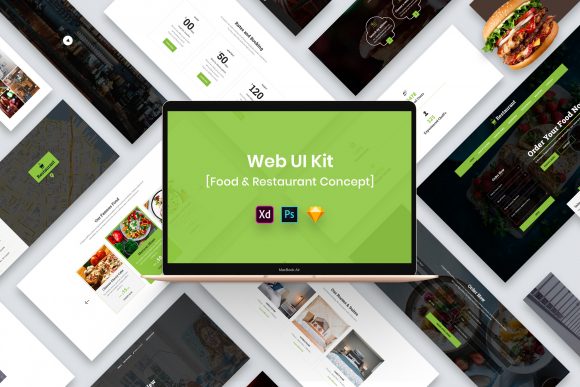
One of the most significant strengths of this resource is its adaptability across the industry's leading design tools. The kit is available in four distinct formats: PSD, Figma, Sketch, and Adobe XD. This multi-format approach ensures that regardless of your preferred ecosystem, you can integrate these assets seamlessly into your existing workflow.
- Figma Users: Can leverage the component-based architecture for rapid prototyping and real-time collaboration with development teams.
- Adobe XD Enthusiasts: Will find the auto-animate capabilities ready to be applied to the pre-designed screens for interactive demos.
- Sketch Professionals: Benefit from the symbol libraries that ensure consistency across different artboards.
- Photoshop (PSD) Designers: Appreciate the pixel-perfect layers that allow for detailed image manipulation and high-fidelity mockup creation.
The files are noted for being well-organized. In professional design, a messy layer panel is a productivity killer. This kit mitigates that risk by grouping elements logically, naming layers clearly, and separating background elements from interactive components. This organization makes the files easily editable, meaning that changing a color scheme to match a specific brand identity or swapping out typography can be done in minutes rather than hours.
Key Features and Technical Specifications
Beyond the structural layout, the Food Order Web UI Kit boasts several technical features that cater to high-quality production standards. The design is Retina Ready, ensuring that icons, images, and text remain crisp on high-density displays, which is crucial given the prevalence of mobile devices and 4K monitors among consumers today.
Furthermore, the template utilizes free fonts. Licensing can be a complex hurdle in commercial projects, but this kit simplifies the process. While the specific font files are not included in the download package due to licensing restrictions, a "Fonts Used" file is provided within the package. This file contains direct links to the typefaces, allowing designers to install them legally and immediately. This attention to detail reflects a creative and professional design approach that respects intellectual property while providing maximum convenience.
It is important to note a critical limitation regarding the visual assets: All Images, Vectors, and Mock-ups are used for preview purposes only and are NOT included in the download files. The placeholders you see in the promotional materials are there to demonstrate the potential of the layout. The credits for these preview images belong to their respective authors. Users must source their own photography or illustrations. While this requires an extra step, it actually offers a benefit: it forces the final product to be unique to the specific restaurant or brand, avoiding the generic look that can occur when everyone uses the same stock photos.
Real-World Applications and Use Cases
Who stands to benefit most from adopting this Web UI Kit Template? The applications are diverse, spanning various sectors of the food and technology industries.
- Restaurant Startups: New cloud kitchens or ghost restaurants often need to launch a web presence quickly to begin taking orders. Using this kit allows them to bypass the initial design phase and move straight to customization and development.
- Agencies and Freelancers: For design agencies handling multiple clients, having a robust base template increases profit margins by reducing the hours billed for foundational UI work. It allows the team to focus on high-value tasks like user research and custom branding.
- Food Delivery Aggregators: Companies building niche delivery platforms (e.g., organic food only, late-night snacks) can use the kit to prototype new features or test market viability before committing to a full custom build.
- Educational Purposes: Aspiring UI/UX designers can study the structure of the Food Order Web UI Kit to understand best practices in information architecture, spacing, and hierarchy within the context of e-commerce.
Evaluating Suitability for Your Project
Before integrating any template into a project, it is essential to evaluate its suitability against your specific requirements. The Food Order Web UI Kit excels in scenarios where speed, cleanliness, and standard e-commerce flows are priorities. Its fully customizable nature means it can be stretched to fit various brand identities, from a playful burger joint to an upscale sushi bar, provided the underlying photography supports the tone.
However, if your project requires highly unconventional navigation patterns, complex gamification elements, or a radically unique artistic direction that defies standard grid systems, this minimal kit might require significant modification. In such cases, the template serves better as a reference for component design rather than a turnkey solution.
Additionally, developers should consider the handoff process. Because the layers are well-organized and the design is pixel-perfect, the transition from design to code is generally smoother. Developers can inspect the Figma or XD files to extract CSS values, spacing metrics, and asset requirements with greater confidence, reducing the back-and-forth communication that often plagues web development projects.
The Value of Purposeful Elements
The term "purposeful elements" used to describe this kit warrants further exploration. In a food ordering context, every element must drive conversion. The search bars are prominent because users often know exactly what they want. The filters (e.g., vegetarian, spicy, price range) are accessible because dietary restrictions are common. The cart summary is persistent because users need to track their spending in real-time.
The Food Order Web UI Kit encapsulates these industry standards. By using a template that has already solved these usability challenges, designers avoid the trap of "reinventing the wheel." Instead, they can innovate on the aspects that truly differentiate their client's brand, such as the storytelling in the "About Us" section or the micro-interactions when an item is added to the cart.
Conclusion
In conclusion, the Food Order Web UI Kit represents a strategic tool for modern digital creators. It bridges the gap between conceptualization and execution, offering a modern and minimal design that aligns with current user expectations. With support for all major design software, a commitment to organized workflows, and a focus on usability, it provides a solid groundwork for building successful food ordering platforms.
While users must supply their own imagery and adhere to font licensing guidelines, the trade-off is a flexible, professional, and efficient starting point that respects the creator's time. For anyone looking to deploy a high-quality food ordering interface without the overhead of a ground-up design process, this kit offers a compelling balance of creativity and practicality. By leveraging such resources, businesses can focus less on the mechanics of design and more on the quality of the food and the satisfaction of their customers.