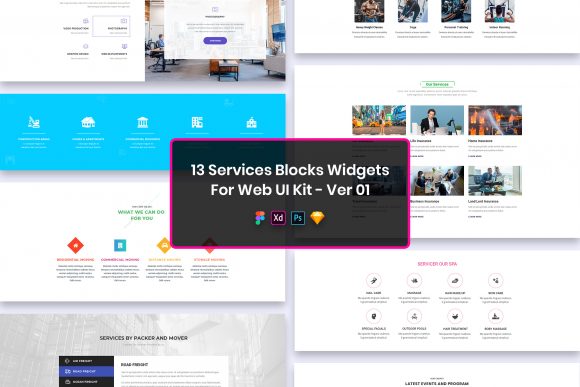
13 Services Blocks Widgets for Web UI Design
In the fast-paced world of web development, the gap between a concept and a live site often comes down to efficiency. Designers and developers are constantly searching for resources that allow them to maintain high standards without reinventing the wheel for every new project. The 13 Services Blocks Widgets for Web UI represents a curated collection designed specifically to bridge this gap. It is not merely a set of graphics; it is a structural foundation for presenting services in a way that is both visually compelling and functionally robust.
This kit stands out because it addresses a common pain point: consistency. When building a services section, whether for a digital agency, a freelance portfolio, or a corporate landing page, maintaining visual harmony across different screen sizes is crucial. These widgets provide that harmony out of the box. They are built with a minimal design philosophy, ensuring that the content remains the hero while the layout supports readability and user engagement. The simplicity of the design does not imply a lack of depth; rather, it offers a clean canvas that can be adapted to fit virtually any brand identity.
Versatility Across File Formats
One of the most practical aspects of this UI kit is its compatibility. In a collaborative environment, teams rarely use a single tool exclusively. Some stakeholders prefer Figma for its cloud-based collaboration features, while others rely on Adobe XD for prototyping or Sketch for vector precision. Legacy projects might still require PSD files. This kit includes all four formats, ensuring that no matter your preferred workflow, you can integrate these elements immediately.
The inclusion of well-organized layers in every file format cannot be overstated. A messy layer panel can turn a simple edit into a frustrating ordeal. Here, every element is named and grouped logically. If you need to change an icon, adjust a color, or swap out text, the structure guides you directly to the source. This organization saves hours of manual cleanup, allowing you to focus on the creative decisions that actually move the needle for your project.
Creative Applications and Project Ideas
While the primary function of these blocks is to list services, their application extends far beyond a standard "What We Do" page. Creative professionals can interpret these widgets in various ways to suit specific narrative goals.
- Agency Portfolios: Use the blocks to highlight core competencies like SEO, branding, or development. The clean lines allow case study thumbnails to shine within the widget structure.
- SaaS Landing Pages: Adapt the layouts to explain feature sets. The purposeful elements can be reconfigured to show pricing tiers or integration capabilities.
- Freelancer Profiles: A consultant can use these to break down their offerings into digestible packages, making it easier for potential clients to understand the value proposition at a glance.
- Educational Platforms: Instructors can utilize the blocks to outline course modules or mentorship tracks, providing a clear roadmap for students.
The key to making these widgets feel original lies in customization. Because the files are fully customizable, you are not locked into a specific look. You can alter the spacing, typography, and iconography to match your brand voice. For instance, a law firm might opt for a more traditional serif font and muted colors, while a tech startup might choose bold sans-serifs and vibrant accents. The underlying grid remains solid, but the surface expression is entirely up to you.
Technical Precision and Usability
A beautiful design is useless if it does not translate well to code or perform poorly on devices. These widgets are pixel perfect, meaning they are crafted with attention to the smallest details. This precision ensures that when you hand off designs to developers, the implementation matches the vision exactly. There is no ambiguity regarding padding, margins, or alignment.
Furthermore, the kit is Retina ready. As high-density displays become the standard across smartphones, tablets, and desktops, ensuring your UI elements look crisp on all screens is non-negotiable. Blurry icons or text can undermine trust instantly. These assets are prepared to scale beautifully, maintaining clarity regardless of the device resolution.
Typography plays a massive role in the effectiveness of these blocks. The kit utilizes free fonts, which removes licensing barriers for commercial projects. You can find the specific fonts used via the link provided in the "Fonts Used" file within the download package. This transparency allows you to install the exact typefaces needed to replicate the demo or choose similar alternatives if you wish to diverge from the original style.
Streamlining the Workflow for Diverse Users
Different users approach design challenges with different goals. Marketers might be looking for conversion-focused layouts, while educators might prioritize clarity and information hierarchy. Entrepreneurs and small business owners often need to launch quickly without sacrificing professionalism. This UI kit serves all these demographics by offering a balance of structure and flexibility.
For the freelancer working under tight deadlines, the "easily editable" nature of the files means they can deliver a polished draft to a client in a fraction of the usual time. For the in-house designer at a larger corporation, the organized layers facilitate easier handoffs to other team members or external agencies. The purposeful elements included in the kit are not just decorative; they are functional components designed to guide the user's eye and encourage interaction.
When adapting these widgets, consider the context of your audience. If you are designing for a mobile-first audience, focus on how the blocks stack vertically. The minimal design ensures that even on smaller screens, the content remains legible and accessible. If your audience is desktop-heavy, you might explore horizontal arrangements or grid variations that take advantage of the wider viewport.
Maintaining Clarity and Consistency
To get the most out of the 13 Services Blocks Widgets for Web UI, it is essential to maintain a consistent design language throughout your project. While the widgets are flexible, mixing too many styles can create visual noise. Stick to a defined color palette and limit your font choices to ensure the services section feels like an integrated part of the whole site, not an afterthought.
Use the whitespace effectively. One of the strengths of minimal design is the use of negative space to create breathing room. Do not feel compelled to fill every pixel. Allowing the elements to sit comfortably within their containers enhances readability and gives the design a premium feel.
It is also important to note the limitations regarding assets. All images, vectors, and mock-ups seen in the preview files are for demonstration purposes only and are not included in the download. This is a standard practice in UI kits to respect intellectual property rights. The credits for these preview assets go to their respective authors. When implementing your design, you will need to source your own imagery or illustrations. This actually works in your favor, as it forces you to select visuals that are unique to your brand rather than relying on generic stock photos that everyone else uses.
Final Thoughts on Implementation
Ultimately, the value of this kit lies in its ability to accelerate the creative process without compromising quality. It provides a professional starting point that respects the intelligence of the end-user. By offering files in PSD, Figma, Sketch, and Adobe XD, it acknowledges the diverse ecosystem of modern design tools. The well-organized layers and pixel-perfect construction demonstrate a commitment to usability that goes beyond mere aesthetics.
Whether you are building a personal brand, launching a startup, or refreshing an enterprise site, these service blocks offer a reliable framework. They invite you to experiment with layout and content while providing the safety net of a proven design structure. In a digital landscape where attention is scarce, presenting your services clearly and attractively is paramount. This kit equips you with the tools to do just that, leaving you free to focus on the strategy and story behind your work.