Forms Widgets for Web UI Kit: A Design Essential
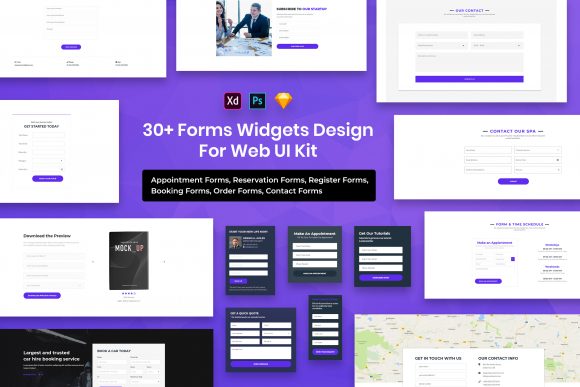
Building a website or application often feels like assembling a complex puzzle, where every piece needs to fit perfectly to create a seamless user experience. Among the most critical pieces of this puzzle are the forms. Whether it is a simple contact box, a detailed registration page, or a checkout process, forms are the primary way users interact with your digital product. This is where the Forms Widgets for Web UI Kit becomes an invaluable asset for designers and developers alike. Instead of starting from scratch with blank artboards, this kit provides a robust foundation of pre-designed elements that save time and ensure consistency.
At its core, this UI kit is a collection of purposeful elements designed to streamline the interface design process. It caters to a wide range of creators, from freelancers working on their first client project to seasoned professionals in large agencies. The main appeal lies in its versatility and ease of use. You are not just getting static images; you are receiving fully editable files that allow you to tweak colors, typography, and layouts to match any brand identity. Because the kit includes PSD, Figma, Sketch, and Adobe XD files, it fits naturally into almost any existing workflow, regardless of your preferred design software.
Why Minimal Design Matters for User Experience
In the world of web design, less is often more. The Forms Widgets for Web UI Kit embraces a minimal design philosophy, which is crucial for creating interfaces that are easy to navigate. When a user lands on a form, they usually have a specific goal in mind, such as signing up for a newsletter or purchasing a product. Cluttered designs with unnecessary decorations can distract from this goal and increase the likelihood of abandonment. By utilizing clean lines, ample whitespace, and clear typography, this kit helps you build forms that guide the user's eye exactly where it needs to go.
The minimal aesthetic also ensures that your forms look professional across different devices. With the rise of mobile browsing, responsive design is non-negotiable. These widgets are crafted to be pixel perfect and retina ready, meaning they will look crisp and sharp on high-density screens found in modern smartphones and tablets. This attention to detail eliminates the guesswork often associated with scaling vector elements or ensuring text readability on smaller displays.
Versatility Across Four Major File Formats
One of the standout features of this kit is the inclusion of four distinct file formats: PSD, Figma, Sketch, and Adobe XD. This variety addresses a common pain point in the design community—compatibility. In many teams, different members might prefer different tools. A UX researcher might favor Figma for its collaboration features, while a visual designer might prefer the depth of Photoshop (PSD) or the vector capabilities of Sketch. By providing all four, this kit ensures that everyone on the team can access and edit the source files without needing to convert formats or lose layer integrity.
Furthermore, the files are known for being well organized. Anyone who has ever downloaded a messy template knows the frustration of untangling hundreds of unnamed layers. In this kit, layers are logically grouped and named, making it incredibly easy to find specific elements like input fields, buttons, or error messages. This organization significantly speeds up the editing process, allowing you to focus on creativity rather than file management.
Practical Applications for Various Projects
The utility of the Forms Widgets for Web UI Kit extends far beyond simple corporate websites. Consider a small business owner launching an e-commerce store. They need a checkout form that builds trust and minimizes friction. Using the customizable elements in this kit, they can quickly assemble a secure-looking payment interface that aligns with their brand colors. Similarly, educators creating online courses can use these widgets to build engaging quiz interfaces or student registration portals without needing advanced coding knowledge.
For marketers and bloggers, lead generation is key. A well-designed subscription form can dramatically increase conversion rates. With this kit, you can experiment with different layouts and call-to-action button styles to see what resonates best with your audience. The fact that the files are fully customizable means you are not locked into a single look. You can adjust border radii, shadow depths, and font weights to create a unique style that stands out from generic templates.
Freelancers and hobbyists will also appreciate the efficiency this tool brings to their workflow. Imagine having a deadline approaching for a client's landing page. Instead of spending hours designing individual input states (default, hover, active, disabled), you can drag and drop pre-made widgets from the kit. This allows you to deliver high-quality work faster, leaving more time for strategy and client communication.
Typography and Visual Consistency
Typography plays a massive role in how information is perceived. The Forms Widgets for Web UI Kit utilizes free fonts, which removes licensing barriers and ensures that your designs remain cost-effective. You can find the specific links to the fonts used in the "Fonts Used" file included in your download package. This transparency makes it easy to install the correct typefaces and maintain consistency throughout your project. Since the fonts are selected to complement the minimal design, they enhance readability and contribute to the overall professional polish of the interface.
It is important to note that while the preview images showcase stunning visuals, the images, vectors, and mock-ups seen in the promotional materials are for preview purposes only and are not included in the download files. This is a standard practice in the industry to keep file sizes manageable and to respect the intellectual property of third-party creators. The credits for these visual assets go to their respective authors. However, the structural elements—the actual form fields, labels, buttons, and containers—are entirely yours to modify and use in your commercial or personal projects.
Things to Consider Before You Start
Before diving into your next project with this kit, there are a few practical considerations to keep in mind. First, while the kit provides excellent starting points, always ensure that your final design meets accessibility standards. This includes checking color contrast ratios between text and background, ensuring input fields are large enough for touch targets on mobile devices, and verifying that the form logic makes sense for users with disabilities. The clean structure of these widgets makes it easier to implement accessible practices, but the responsibility ultimately lies with the designer.
Additionally, think about the context in which your form will appear. A contact form on a portfolio site might require very different fields compared to a multi-step survey for market research. The purposeful elements in this kit are designed to be modular, so feel free to mix and match components to suit your specific needs. Do not feel constrained by the default arrangements; the value of the kit lies in its adaptability.
Finally, remember that a great form is not just about how it looks, but how it functions. While this UI kit handles the visual presentation beautifully, ensure that the backend development matches the quality of the frontend design. A pixel-perfect form that fails to submit data correctly will frustrate users regardless of how good it looks. Use this kit as the visual blueprint for a functional, user-friendly experience.
In summary, the Forms Widgets for Web UI Kit offers a comprehensive solution for anyone looking to elevate their web interface design. With its support for major design tools, organized layer structures, and commitment to minimal, retina-ready aesthetics, it removes many of the technical hurdles associated with form design. Whether you are building a startup MVP, refining a corporate portal, or simply learning the ropes of UI design, this kit provides the reliable, professional components needed to succeed.