Building Trust with the Education Web UI Kit
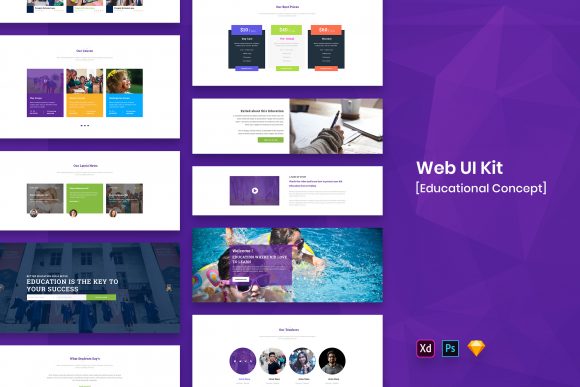
In the crowded digital landscape of online learning, first impressions are often made in milliseconds. Before a student reads a single lesson plan or an entrepreneur reviews a course syllabus, they scan the interface. They are looking for cues that signal professionalism, clarity, and reliability. This is where the Education Web UI Kit becomes an indispensable asset for creators who understand that design is not just about aesthetics—it is about communication. This template is not merely a collection of screens; it is a strategic foundation built on modern and minimal design principles that prioritize user experience above all else.
The visual personality of this kit is defined by its restraint. In a world where educational platforms often suffer from cluttered dashboards and confusing navigation, this template offers a breath of fresh air. It utilizes a clean layout that allows content to breathe, ensuring that the focus remains squarely on the material being taught rather than the interface surrounding it. The design language speaks to a contemporary audience that values efficiency. Whether you are launching a niche coding bootcamp, a corporate training portal, or a creative workshop series, the underlying structure supports a brand identity that feels established and trustworthy.
Versatility Across Digital and Branding Projects
One of the most compelling aspects of working with a resource like the Education Web UI Kit is its adaptability across various mediums. While its primary function is to serve as a robust framework for web design, the assets within extend far beyond the browser window. The included widgets and purposeful elements are designed with such precision that they translate seamlessly into social media graphics, email newsletters, and even packaging design for physical course materials.
For marketers and brand strategists, consistency is the holy grail of building recognition. When your website, promotional decks, and social assets share the same visual DNA, you create a cohesive narrative that resonates with your audience. The kit's minimal approach ensures that it does not clash with your existing brand colors or logo. Instead, it acts as a neutral canvas upon which your brand identity can shine. If your brand relies on a bold serif font for headlines to convey tradition and authority, the clean lines of this UI kit provide the perfect counterbalance. Conversely, if you are aiming for a tech-forward vibe with a geometric sans serif font, the interface complements that modernity without competing for attention.
Consider the practical application for a small business owner launching a new consultancy. You might use the dashboard layouts to present client data, repurpose the testimonial sections for your landing page, and utilize the iconography for your printed brochures. The Education Web UI Kit effectively bridges the gap between digital interaction and tangible brand touchpoints, ensuring that every interaction a customer has with your business feels intentional and polished.
Enhancing Readability and Visual Hierarchy
The core strength of any educational platform lies in its ability to convey information clearly. Complex concepts become even harder to grasp when buried under poor typography and chaotic layouts. This is where the concept of visual hierarchy becomes critical, and this template excels in guiding the user's eye through content logically. The well-organized layers in the source files allow designers to manipulate spacing, weight, and size to establish a clear order of importance.
Readability is not just about the typeface you choose; it is about how that typeface interacts with white space, line height, and contrast. The Education Web UI Kit is built with these factors in mind. The default settings promote high legibility, which is essential for long-form reading common in e-learning environments. By using a system that prioritizes clarity, you reduce cognitive load for your users. They spend less energy figuring out where to look and more energy absorbing the knowledge you are providing.
Furthermore, the inclusion of retina ready assets ensures that text and vector elements remain crisp on high-density displays. In an era where students access content from everything from budget tablets to 4K monitors, pixel perfection is non-negotiable. Blurry icons or jagged text can subconsciously signal low quality, undermining the perceived value of your course. This kit eliminates that risk, delivering sharp visuals that reinforce a perception of premium quality and attention to detail.
Practical Workflow for Designers and Entrepreneurs
Time is a scarce resource for entrepreneurs and creative professionals. The value of the Education Web UI Kit is amplified by its technical execution. It comes in four major formats: PSD, Sketch, Figma, and Adobe XD. This flexibility means you are not forced to switch your preferred workflow. If your team collaborates in Figma, you can drop the file straight into your project and start customizing immediately. If you are a solo designer who prefers the depth of Photoshop, the PSD version is ready to go with well-organized layers that make editing intuitive.
When integrating this kit into your project, start by evaluating the included widgets. These are not generic placeholders; they are purposeful elements designed to solve common UI problems. From navigation bars to course progress trackers, each component has been thought out to serve a specific function. However, do not feel constrained by the defaults. The files are fully customizable, allowing you to tweak colors, swap out icons, and adjust layouts to fit your specific needs.
A crucial step in the process is font pairing. While the kit includes free fonts (details of which are found in the "Fonts Used" file within your download package), you may wish to introduce a display font for marketing headers or a script font for personal touches in your branding. When testing these pairings, ensure that the contrast in style enhances readability rather than detracting from it. A heavy, decorative header works best when paired with a simple, clean body text—a balance this minimal kit naturally supports.
It is also important to note the licensing terms regarding the assets. All images, vectors, and mock-ups seen in the preview are for demonstration purposes only and are not included in the final download. The credits for these visual elements belong to their respective authors. This is a standard practice in premium design resources, allowing the template creator to showcase the potential of the layout without inflating the file size or complicating the license with third-party stock photography. You will need to source your own imagery, which is actually a benefit; it forces you to curate photos that truly reflect your unique brand story rather than relying on generic stock shots.
Investing in Professional Consistency
Ultimately, adopting a tool like the Education Web UI Kit is an investment in the professionalism of your venture. Whether you are a hobbyist turning a passion into a business or a publisher expanding into digital courses, the quality of your interface reflects the quality of your content. A disjointed, amateurish design can create friction, causing potential students to bounce before they even engage with your material.
By leveraging a template that is both creative and professional, you streamline the production process while elevating the end result. The minimal design ensures longevity; trends come and go, but clean, functional interfaces remain relevant. This allows you to focus your energy on what truly matters: creating valuable content and connecting with your audience. In the competitive sphere of online education, giving your users a seamless, visually pleasing environment is one of the most effective ways to build loyalty and drive engagement.