Building Trust and Speed: A Practical Look at the Hosting Services Web UI Kit
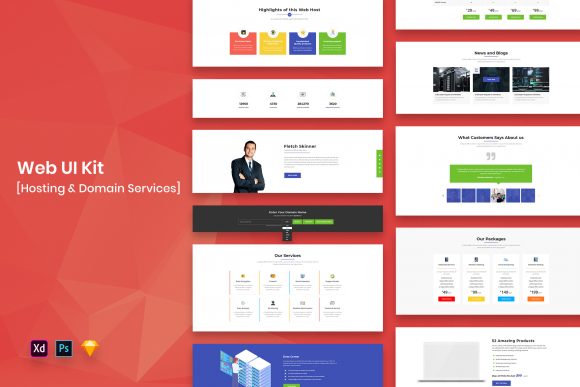
In the fast-paced world of web hosting, first impressions are often the only impressions you get. When a potential customer lands on your site, they aren't just looking for server specs; they are looking for reliability, speed, and professionalism. This is where a dedicated Hosting Services Web UI Kit becomes more than just a collection of graphics—it becomes a strategic asset. Designed as a modern and minimal template available in PSD, Sketch, Figma, and Adobe XD formats, this resource allows designers and developers to bypass the blank canvas paralysis and jump straight into crafting high-converting interfaces.
The reality of designing for the hosting industry is that it can easily become cluttered. Between pricing tables, feature lists, domain search bars, and technical support widgets, there is a lot of information to convey. The strength of this specific UI kit lies in its purposeful elements. It doesn't just provide generic buttons; it offers well-organized widgets specifically tailored to the needs of hosting providers. Whether you are launching a new cloud storage platform, a managed WordPress host, or a VPS provider, having a library of pre-built, pixel-perfect components ensures consistency across your digital presence.
Real-World Scenarios for Rapid Deployment
Imagine you are a freelance designer working with a startup hosting company that has a tight launch deadline. The founders have a great infrastructure but no visual identity yet. Instead of spending weeks mocking up every single state of a dropdown menu or designing a pricing card from scratch, you can leverage the Hosting Services Web UI Kit. Because the files are fully customizable and come with well-organized layers, you can adapt the color palette to match the brand's logo within minutes. The minimal design aesthetic ensures that the focus remains on the content and the call-to-action buttons, which is crucial for driving sign-ups.
Another common scenario involves established agencies managing multiple client accounts. For an agency handling a portfolio of tech clients, efficiency is key. Using a template that includes four different file formats (PSD, Sketch, Figma, Adobe XD) means that no matter what tool your team prefers, everyone is on the same page. You might have a UX researcher working in Figma while the final polish happens in Adobe XD. The ability to switch between these environments without losing fidelity saves hours of translation work and reduces the risk of design errors slipping into production.
Tailoring the Experience for Different Audiences
The beauty of a versatile UI kit is its adaptability to different sectors within the broader hosting market. For instance, a company targeting enterprise-level clients needs a design that screams security and robustness. By utilizing the creative and professional design elements found in this kit, you can strip away unnecessary flair and focus on clean lines, clear typography, and data-heavy dashboards. The retina-ready fonts and vectors ensure that even when displaying complex server uptime graphs or detailed bandwidth statistics, the interface remains crisp on high-resolution displays.
Conversely, if your target audience is students or hobbyists looking for affordable shared hosting, the approach shifts. Here, the "minimal design" aspect shines by creating a friendly, approachable vibe. You can use the included widgets to create playful yet functional domain search bars or simplified setup wizards. The fact that the fonts are free and easily editable means you can swap in a typeface that feels more casual and inviting without worrying about licensing fees or broken layouts. This flexibility allows the same core kit to serve vastly different brand voices effectively.
Practical Considerations Before You Start
While the benefits of using a pre-made kit are substantial, there are practical considerations to keep in mind to ensure the best results. First and foremost, remember that the images, vectors, and mock-ups included in the preview are for demonstration purposes only. They are not part of the actual download files. This is a standard practice in the industry to protect intellectual property, but it means you need to have your own assets ready or source high-quality stock photography that aligns with your brand narrative. Relying on the placeholder graphics will result in a generic look that fails to build trust.
Additionally, while the layers are well-organized, taking a moment to understand the structure of the file before diving in can save significant time later. Each format—whether it is Sketch or Photoshop—has its own way of handling symbols and components. Spending ten minutes exploring how the "Purposeful Elements" are grouped can prevent frustration when you need to make global changes, such as updating a primary button color across fifty different screens. The kit is designed to be easily editable, but respecting the underlying organization maximizes that benefit.
Strengths and Limitations in a Professional Workflow
The primary strength of the Hosting Services Web UI Kit is its ability to standardize quality. In a DIY approach, inconsistency often creeps in; one page might have a shadow depth of 4px while another uses 8px. A professional kit eliminates this guesswork, providing a cohesive system that makes your product look polished and established from day one. The inclusion of free fonts is another major plus, removing legal hurdles and ensuring that the typography renders correctly on all devices without additional cost.
However, it is important to recognize the limitations. A template, no matter how good, is a starting point, not a finished product. If every hosting company uses the exact same layout without customization, the web becomes monotonous. The goal should be to use the kit as a foundation upon which to build your unique value proposition. Use the widgets as guides, but don't be afraid to rearrange them, combine them, or modify them to fit specific user flows that are unique to your service offering. The "Creative and Professional Design" label implies a high standard, but true creativity comes from how you apply these tools to solve your specific business problems.
Ultimately, whether you are a solo entrepreneur launching a niche hosting solution or a large team revamping an existing platform, having access to a robust set of design resources changes the trajectory of your project. It shifts the focus from "how do I make this button look good?" to "how does this button help the user achieve their goal?" That shift in perspective is where real business value is created. By leveraging the Hosting Services Web UI Kit, you equip yourself with the tools to build interfaces that are not only visually appealing but also functionally superior, helping you stand out in a crowded marketplace.