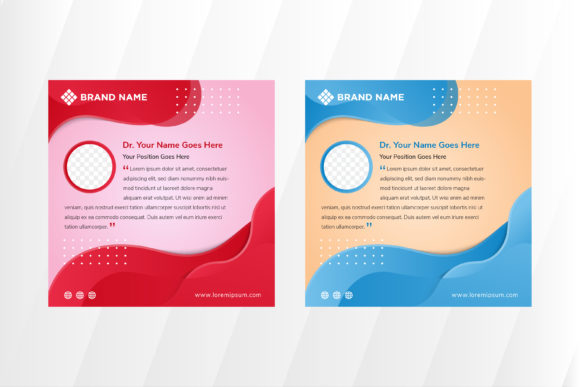
Why a Clean and Modern Social Media Post or Web Banner Template Changes How You Promote Your Business
If you have ever stared at a blank canvas in Photoshop or Canva, wondering why your latest announcement looks cluttered or unprofessional, you are not alone. In the fast-paced world of digital marketing, first impressions happen in milliseconds. A Social Media Post or Web Banner Template is more than just a pre-made graphic; it is a strategic shortcut that ensures your message lands with clarity and impact. Whether you are a freelancer launching a new service, a small business owner announcing a flash sale, or an educator sharing course updates, having a reliable design foundation can save hours of frustration and significantly boost engagement.
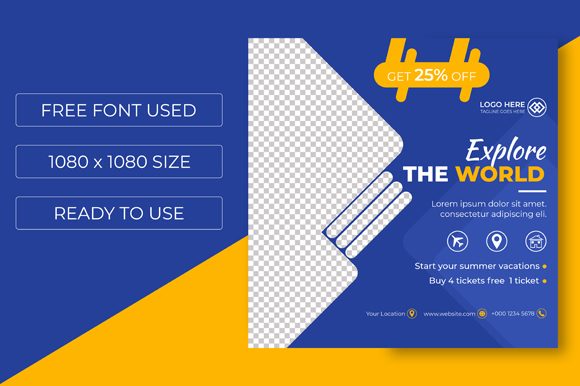
At its core, this type of template provides a structured layout where every element serves a purpose. The specific template we are discussing features a clean, modern aesthetic designed to cut through the noise of crowded social feeds. It comes as an AI File, meaning it is built in Adobe Illustrator, offering vector-based scalability. With dimensions of 1080 px x 1080 px and set in RGB Color Mode, it is optimized specifically for screens, ensuring your colors pop on smartphones, tablets, and desktop monitors without the risk of pixelation.
Real-World Scenarios Where This Template Shines
The true value of a high-quality template reveals itself when you apply it to real-life situations. It is not about having a pretty picture; it is about solving communication problems efficiently. Here is how different users can leverage this resource effectively:
- The Local Café Owner: Imagine you need to announce a "Happy Hour" special starting tomorrow. Instead of wrestling with alignment tools or guessing font pairings, you open the AI file, swap the placeholder text with your offer, change the background color to match your brand's warm tones, and export. The result is a polished graphic that looks like it came from an agency, posted within minutes.
- The Fitness Coach: You are launching a new 30-day challenge. Consistency is key in fitness branding. By using the same clean template structure for your daily tips, client testimonials, and sign-up calls, you create a recognizable visual identity. Followers begin to associate that specific layout with your expertise, building trust before they even read the caption.
- The Corporate HR Manager: Internal communications often get ignored if they look dry or outdated. When posting about open job positions or company culture events on LinkedIn or internal portals, a modern banner template makes the opportunity feel exciting and professional. The editable elements allow you to insert specific role titles and application deadlines without breaking the design flow.
- The Hobbyist Blogger: Perhaps you run a blog about sustainable living. You want to share a infographic-style post about recycling tips. The 1080x1080 square format is perfect for Instagram, but because the file is vector-based, you can also scale it up for a Pinterest pin or a website header without losing quality. This versatility means one design asset works across multiple platforms.
Why Editability and Vector Formats Matter
You might wonder why the file format matters so much. Many free templates online come as flattened JPEGs or PNGs. While these look fine initially, they are rigid. If you need to move a text box slightly to the left or change a shape's curve, you often end up with awkward gaps or distorted images.
This Social Media Post or Web Banner Template being an AI File changes the game. Vector graphics use mathematical paths rather than pixels. This means every line, shape, and letter remains crisp regardless of how much you resize it. For a marketer, this flexibility is crucial. Maybe today you need a square post for Instagram, but next week you need a rectangular banner for a Facebook ad. With an editable AI file, you can adjust the artboard and rearrange elements seamlessly. The fact that all main elements are customizable means you are not forced into a design that doesn't fit your voice; you are empowered to adapt the design to fit your needs.
Connecting Design Features to Business Outcomes
It is easy to get lost in technical specs like "RGB Color Mode," but let's translate that into real outcomes. RGB stands for Red, Green, Blue, which is the color model used by electronic displays. If you design in CMYK (used for print), your colors often look dull or shifted when viewed on a phone screen. By starting with a template already set to RGB, you ensure that the vibrant blue of your logo or the energetic orange of your "Sale" badge appears exactly as intended to your audience. This attention to detail prevents the subconscious disconnect users feel when a brand's online presence looks washed out or inconsistent.
Furthermore, the "clean and modern" style is not just an aesthetic choice; it is a usability feature. In an era where users scroll rapidly, cluttered designs cause cognitive overload. A layout with ample white space, clear typography, and focused imagery guides the viewer's eye directly to the most important information—usually your call to action. When people can instantly understand what you are offering, they are more likely to click, share, or buy.
What to Consider Before You Start Editing
Before you download and dive into editing, there are a few practical considerations to keep in mind to maximize the utility of this template.
- Brand Alignment: While the template is customizable, ensure the base style aligns with your brand personality. If your brand is playful and chaotic, a ultra-minimalist template might need significant tweaking to feel "you." Conversely, if you are a law firm or financial advisor, this clean style is likely a perfect match.
- Software Familiarity: Since this is an AI file, you will need access to Adobe Illustrator or a compatible vector editor. If you primarily use Canva or Photoshop, check if you can import the AI layers or if you need to convert them. Understanding your workflow beforehand saves time.
- Content Hierarchy: Just because you can edit everything doesn't mean you should fill every inch. Resist the urge to add too many logos, icons, or lines of text. The strength of this template lies in its simplicity. Decide on one primary message per post.
- Platform Specifics: While 1080x1080 is the gold standard for Instagram and Facebook feeds, remember that other platforms have different requirements. Stories and Reels require 9:16 ratios. Use this template as a master asset, but be prepared to crop or extend backgrounds if you plan to repurpose the content for vertical formats.
Making the Most of Your Design Investment
Ultimately, acquiring a professional Social Media Post or Web Banner Template is an investment in your efficiency and brand perception. It removes the barrier between having a great idea and sharing it with the world. For entrepreneurs and creators, time is the most scarce resource. By eliminating the need to design from scratch for every single post, you free up mental energy to focus on strategy, engagement, and product development.
Whether you are promoting a webinar, showcasing a new product line, or simply sharing a motivational quote to engage your community, the right template acts as a reliable partner. It ensures that no matter how busy your schedule gets, your public-facing content maintains a standard of quality that commands respect. In a digital landscape that never sleeps, consistency is king, and a versatile, editable template is the crown that helps you wear it effortlessly.